这里是对rails365的跨域资源共享 CORS教程做的一个springboot版本原文链接
所谓跨域,顾名思义,跨到了另外的域,域不仅仅指的是不同的域名网站,可能同一个域名不同的端口号也算不同的域。浏览器是有规则的,只要协议、域名、端口有任何一个不同,都被当作是不同的域。协议指的是http,或者https等。
首先写了两个springboot的demo,端口分别为8080做server,8000做client
server端代码1
2
3
4
5
6
7
8
9
10
11
12
13
14
15
16
17
18
19
20
21
22
23
24
25
26package server;
import org.springframework.boot.SpringApplication;
import org.springframework.boot.autoconfigure.SpringBootApplication;
import org.springframework.stereotype.Controller;
import org.springframework.web.bind.annotation.RequestMapping;
import org.springframework.web.bind.annotation.ResponseBody;
/**
* @author panhb
*/
public class ServerApplication {
("/")
String home() {
return "Hello World!";
}
public static void main(String[] args) {
SpringApplication.run(ServerApplication.class, args);
}
}
下面是client代码1
2
3
4
5
6
7
8
9
10
11
12
13
14
15
16package client;
import org.springframework.boot.SpringApplication;
import org.springframework.boot.autoconfigure.SpringBootApplication;
/**
* @author panhb
*/
public class ClientApplication {
public static void main(String[] args) {
SpringApplication.run(ClientApplication.class, args);
}
}
client里面还有页面部分的代码,用的jquery的ajax模拟发起跨域请求1
2
3
4
5
6
7
8
9
10
11
12
13
14
15
16
17
18
19
20
21
22
23
24
<html>
<head>
<meta charset="UTF-8">
<title>cors demo</title>
</head>
<body>
<div id="result"></div>
<script src="jquery-3.3.1.min.js"></script>
<script>
$.ajax({
url : "http://localhost:8080/",
type : "POST",
dataType : "text",
success : function (data) {
$("#result").text(data);
},
error : function (err) {
console.log(err);
}
});
</script>
</body>
</html>
用的浏览器是chrome,版本 63.0.3239.132(正式版本)(64 位)
结果如下图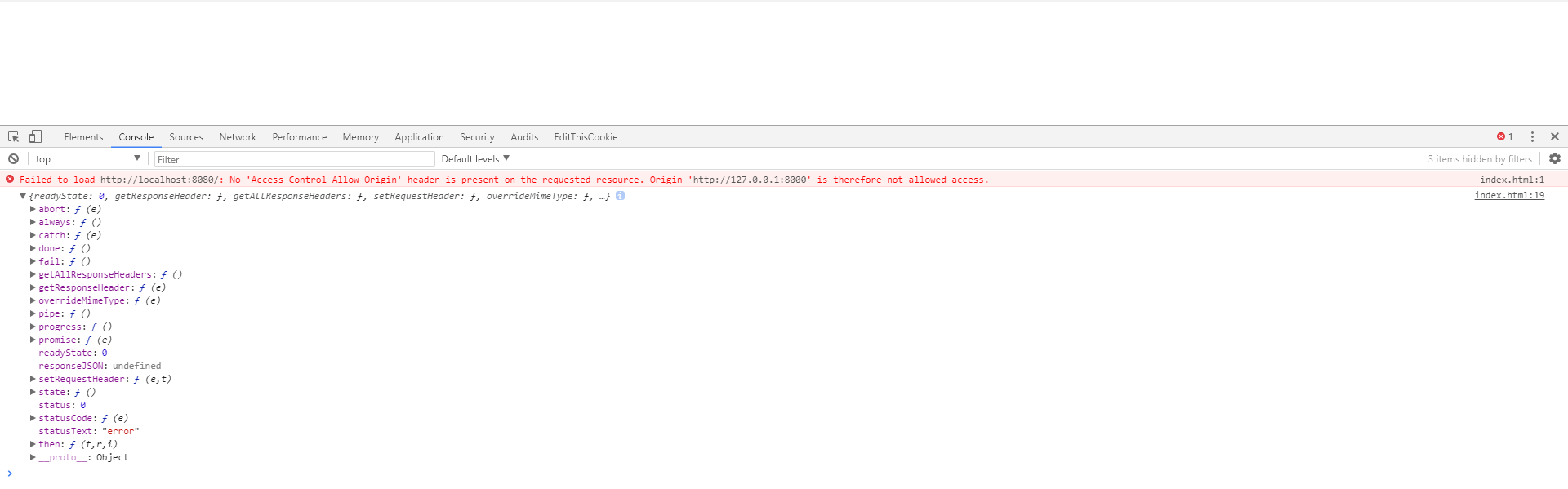
1. Access-Control-Allow-Origin
springboot有三种方式可以配置cros,server端代码1
2
3
4
5
6
7
8
9
10
11
12
13
14
15
16
17
18
19
20
21
22
23
24
25
26
27
28
29
30
31
32
33
34
35
36
37
38
39
40
41
42
43
44
45
46
47
48
49
50
51
52
53
54
55
56
57
58
59package server;
import org.springframework.boot.SpringApplication;
import org.springframework.boot.autoconfigure.SpringBootApplication;
import org.springframework.context.annotation.Bean;
import org.springframework.stereotype.Controller;
import org.springframework.web.bind.annotation.CrossOrigin;
import org.springframework.web.bind.annotation.RequestMapping;
import org.springframework.web.bind.annotation.ResponseBody;
import org.springframework.web.cors.CorsConfiguration;
import org.springframework.web.cors.UrlBasedCorsConfigurationSource;
import org.springframework.web.filter.CorsFilter;
import org.springframework.web.servlet.config.annotation.CorsRegistry;
import org.springframework.web.servlet.config.annotation.WebMvcConfigurer;
import org.springframework.web.servlet.config.annotation.WebMvcConfigurerAdapter;
/**
* @author panhb
*/
public class ServerApplication {
("/")
// @CrossOrigin(origins = "*") 1.利用cors注解
String home() {
return "Hello World!";
}
// @Bean 2.利用filter配置cros,注明此处必须配置addAllowedOrigin和addAllowedMethod才生效
CorsFilter corsFilter() {
UrlBasedCorsConfigurationSource source = new UrlBasedCorsConfigurationSource();
CorsConfiguration corsConfiguration = new CorsConfiguration();
//设置访问源地址
corsConfiguration.addAllowedOrigin("*");
//设置访问源请求方法
corsConfiguration.addAllowedMethod("*");
//对接口配置跨域设置
source.registerCorsConfiguration("/**", corsConfiguration);
return new CorsFilter(source);
}
// @Bean 3.利用WebMvcConfigurer注册cros
WebMvcConfigurer corsConfigurer() {
return new WebMvcConfigurerAdapter() {
public void addCorsMappings(CorsRegistry registry) {
registry.addMapping("/**")
.allowedOrigins("*");
}
};
}
public static void main(String[] args) {
SpringApplication.run(ServerApplication.class, args);
}
}
2. Preflight 请求
修改html中ajax的请求方式,代码如下1
2
3
4
5
6
7
8
9
10
11$.ajax({
url : "http://localhost:8080/",
type : "PATCH",
dataType : "text",
success : function (data) {
$("#result").text(data);
},
error : function (err) {
console.log(err);
}
});
结果如下图
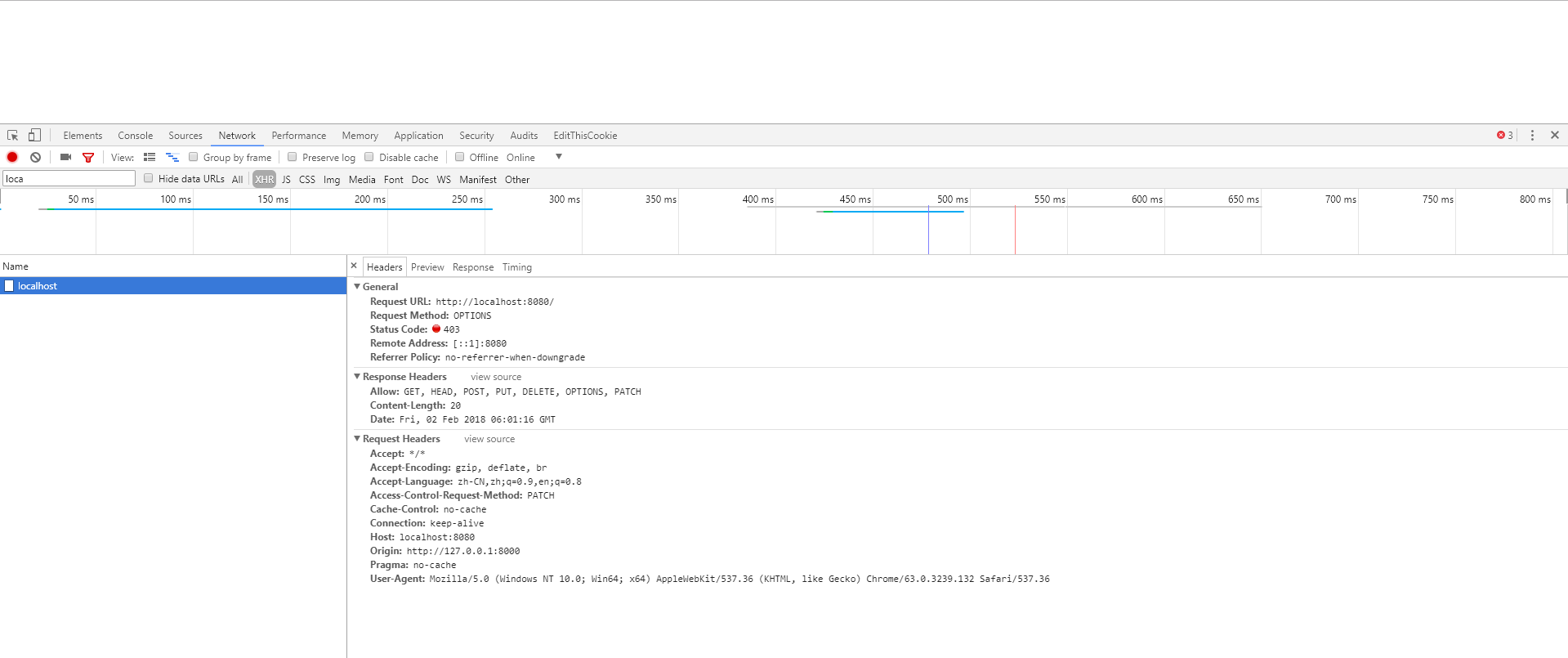
这个OPTIONS请求也叫Preflight请求,发起PATCH真实请求时,先询问服务器是否支持PATCH方法
修改服务端,支持PATCH方法的跨域请求1
(origins = "*",methods = RequestMethod.PATCH)
1 |
|
1 | WebMvcConfigurer corsConfigurer() { |
修改后返回结果如下图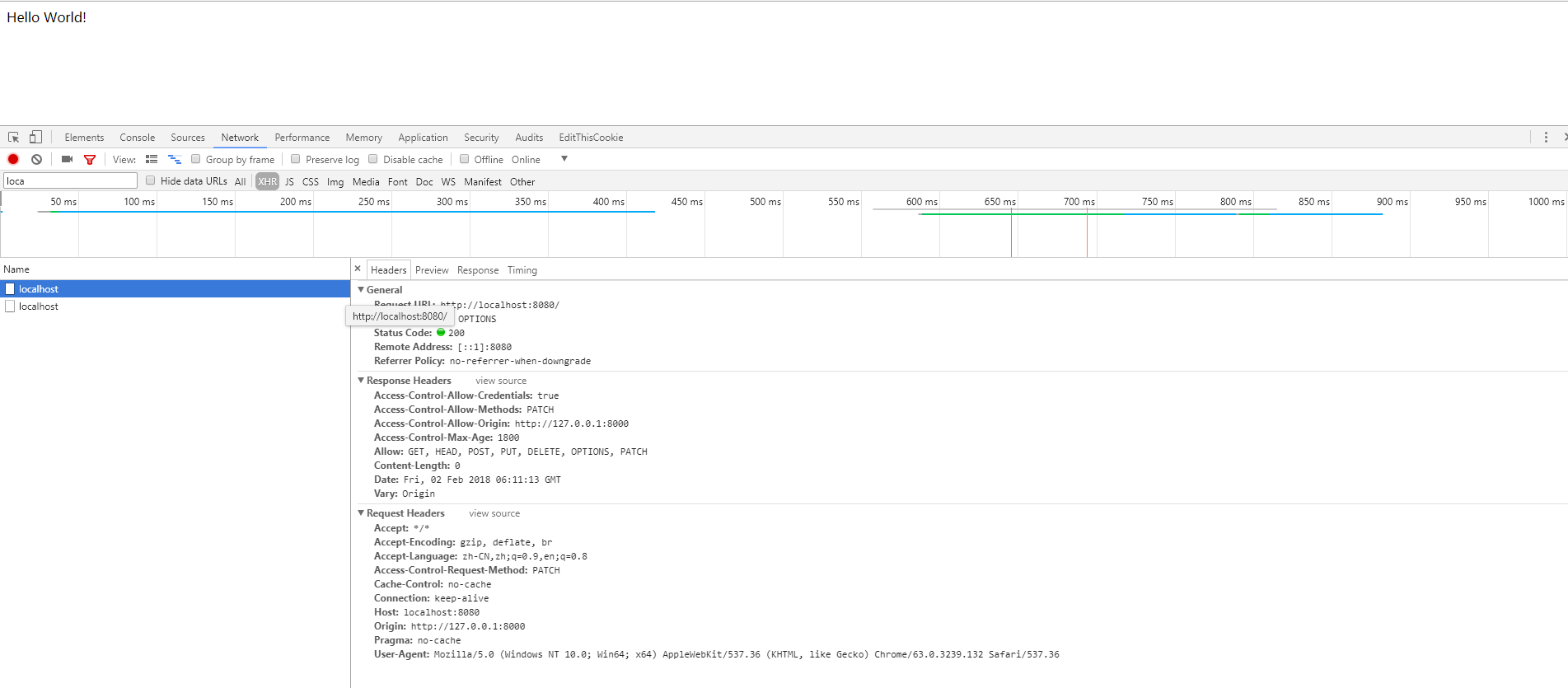
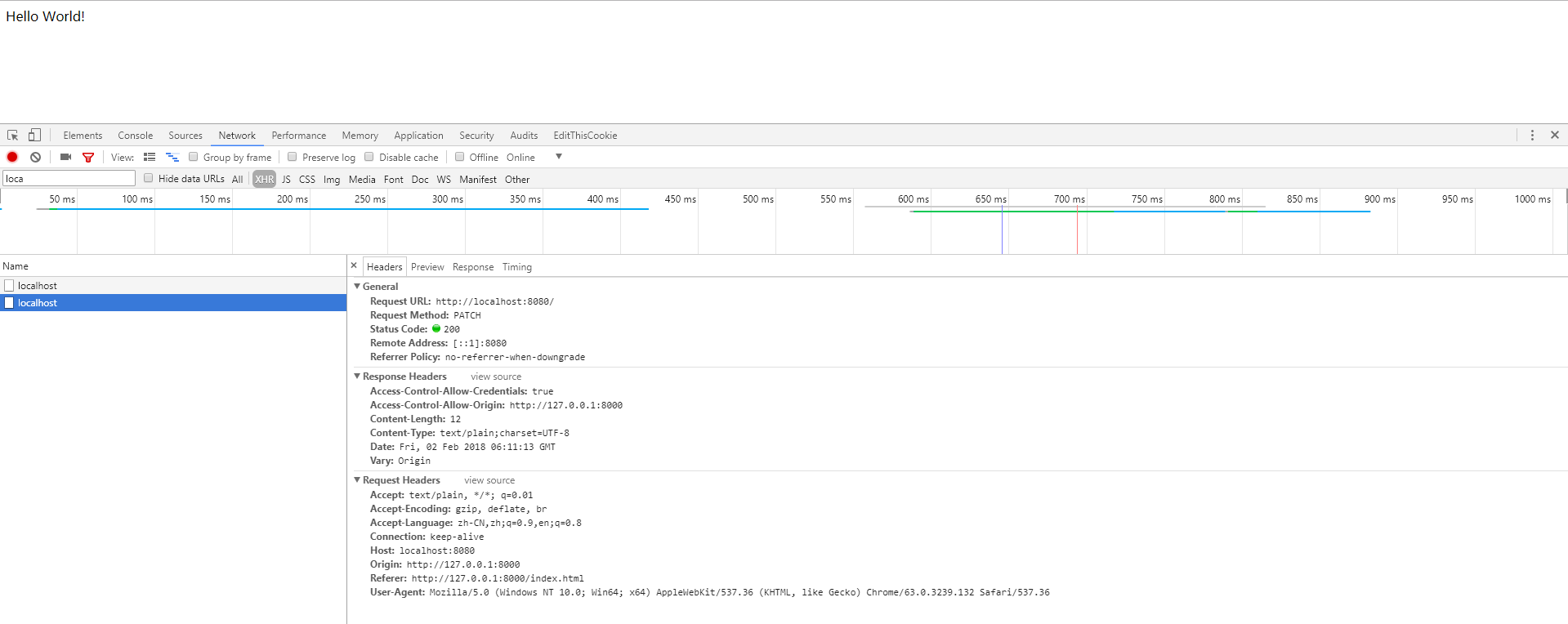
chrome发送过一次option,且成功后,下次请求不会再发送option询问服务器
那么有哪些情况,浏览器会发送option请求询问服务器呢
- 使用的方法不是GET, POST, 或 HEAD的任何一种
- Content-Type请求来不是下面任何一种
- application/x-www-form-urlencoded
- multipart/form-data
- text/plain
- 不寻常的请求头,例如不是下面的几种:
- Accept
- Accept-Language
- Content-Language
- XMLHttpRequest的upload事件
3. 设置请求头信息
修改html中ajax,代码如下1
2
3
4
5
6
7
8
9
10
11
12
13
14$.ajax({
url : "http://localhost:8080/",
type : "POST",
headers: {
corsheader: "testCrosHeader"
},
dataType : "text",
success : function (data, status, xhr) {
$("#result").text(data);
},
error : function (err) {
console.log(err);
}
});
除了corsFilter需要设置addAllowedHeader外,其他两种方式,不需要设置就可以获取自定义的请求头,但是为了保险起见,还是都设置一下比较好,下面给出设置的代码1
(origins = "*",methods = {RequestMethod.GET,RequestMethod.POST,RequestMethod.PUT,RequestMethod.OPTIONS,RequestMethod.DELETE},allowedHeaders = "*")
1 |
|
1 |
|
4. cookie
修改html中ajax,代码如下1
2
3
4
5
6
7
8
9
10
11
12
13
14
15
16
17$.ajax({
url : "http://localhost:8080/",
type : "POST",
headers: {
corsheader: "testCrosHeader"
},
xhrFields: {
withCredentials: true
},
dataType : "text",
success : function (data, status, xhr) {
$("#result").text(data);
},
error : function (err) {
console.log(err);
}
});
如下处理后,后端就可以正常接收前端的cookie1
(origins = "*",methods = {RequestMethod.GET,RequestMethod.POST,RequestMethod.PUT,RequestMethod.OPTIONS,RequestMethod.DELETE},allowedHeaders = "*",allowCredentials = "true")
1 |
|
1 |
|
说明,当我尝试在ajax请求中修改header的cookie的值时,代码如下1
2
3
4
5
6
7
8
9
10
11
12
13$.ajax({
url : "http://localhost:8080/",
type : "POST",
headers: {
Cookie: document.cookie
},
dataType : "text",
success : function (data, status, xhr) {
},
error : function (err) {
console.log(err);
}
});
浏览器提示
Refused to set unsafe header “cookie”
后查证,禁止修改请求头以Proxy- 或者 Sec-开始,或者包含以下任何一种:
- Accept-Charset
- Accept-Encoding
- Access-Control-Request-Headers
- Access-Control-Request-Method
- Connection
- Content-Length
- Cookie
- Cookie2
- Date
- DNT
- Expect
- Host
- Keep-Alive
- Origin
- Proxy-
- Sec-
- Referer
- TE
- Trailer
- Transfer-Encoding
- Upgrade
- Via
5. Expose-Headers
修改html中ajax,代码如下1
2
3
4
5
6
7
8
9
10
11
12
13
14
15
16
17
18$.ajax({
url : "http://localhost:8080/",
type : "POST",
headers: {
corsheader: "testCrosHeader"
},
xhrFields: {
withCredentials: true
},
dataType : "text",
success : function (data, status, xhr) {
console.log(xhr.getAllResponseHeaders());
$("#result").text(data);
},
error : function (err) {
console.log(err);
}
});
后端代码如下1
2
3
4
5
6
7
8
9
10
11
12
13
14
15
16
17
18
19
20
21
22
23
24
25
26
27
28
29
30
31
32
33
34
35
36
37
38
39
40
41
42
43
44
45
46
47
48
49
50
51
52
53
54
55
56
57
58
59
60
61
62
63
64
65
66
67
68
69
70
71
72
73
74
75
76
77
78
79
80
81
82package server;
import org.springframework.beans.factory.annotation.Autowired;
import org.springframework.boot.SpringApplication;
import org.springframework.boot.autoconfigure.SpringBootApplication;
import org.springframework.context.annotation.Bean;
import org.springframework.stereotype.Controller;
import org.springframework.web.bind.annotation.CrossOrigin;
import org.springframework.web.bind.annotation.RequestMapping;
import org.springframework.web.bind.annotation.RequestMethod;
import org.springframework.web.bind.annotation.ResponseBody;
import org.springframework.web.cors.CorsConfiguration;
import org.springframework.web.cors.UrlBasedCorsConfigurationSource;
import org.springframework.web.filter.CorsFilter;
import org.springframework.web.servlet.config.annotation.CorsRegistry;
import org.springframework.web.servlet.config.annotation.WebMvcConfigurer;
import org.springframework.web.servlet.config.annotation.WebMvcConfigurerAdapter;
import javax.servlet.http.HttpServletRequest;
import javax.servlet.http.HttpServletResponse;
/**
* @author panhb
*/
public class ServerApplication {
HttpServletRequest request;
HttpServletResponse response;
(value = "/")
(origins = "*",methods = {RequestMethod.GET,RequestMethod.POST,RequestMethod.PUT,RequestMethod.OPTIONS,RequestMethod.DELETE},
allowedHeaders = "*",allowCredentials = "true",exposedHeaders="test,test1")
String home() {
response.addHeader("test","crostest");
response.addHeader("test1","crostest1");
return "header="+ request.getHeader("corsheader") +
",cookie=" + request.getCookies()[request.getCookies().length-1].getValue();
}
// @Bean
CorsFilter corsFilter() {
UrlBasedCorsConfigurationSource source = new UrlBasedCorsConfigurationSource();
CorsConfiguration corsConfiguration = new CorsConfiguration();
//设置访问源地址
corsConfiguration.addAllowedOrigin("*");
//设置访问源请求头
corsConfiguration.addAllowedHeader("*");
//设置访问源请求方法
corsConfiguration.addAllowedMethod("*");
corsConfiguration.setAllowCredentials(true);
corsConfiguration.addExposedHeader("test,test1");
//对接口配置跨域设置
source.registerCorsConfiguration("/**", corsConfiguration);
return new CorsFilter(source);
}
// @Bean
WebMvcConfigurer corsConfigurer() {
return new WebMvcConfigurerAdapter() {
public void addCorsMappings(CorsRegistry registry) {
registry.addMapping("/**")
.allowedOrigins("*")
.allowedMethods("*")
.allowedHeaders("*")
.allowCredentials(true)
.exposedHeaders("test,test1");
}
};
}
public static void main(String[] args) {
SpringApplication.run(ServerApplication.class, args);
}
}
结果如下图